
bmo
A minimal, GPU-accelerated Pomodoro timer built with Rust and GPUI: focus sessions, breaks, session tracking, and a dark-themed desktop UI.
#productivity-tools / rust · gpui
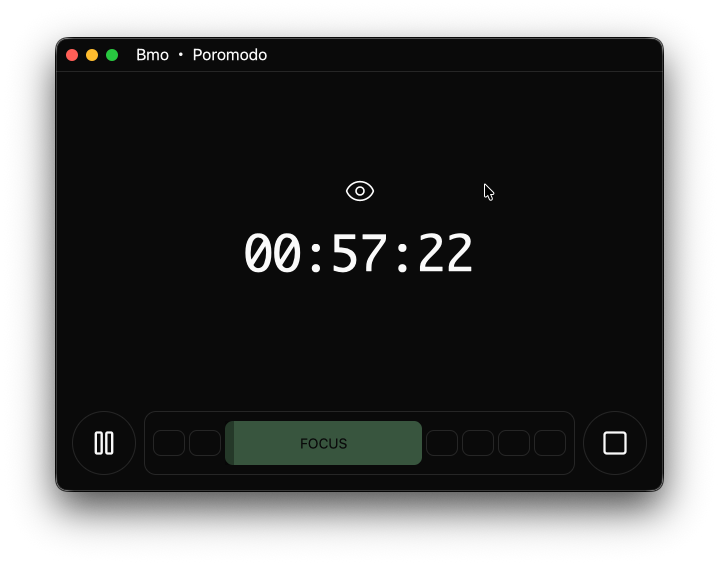
Why BMO
Pomodoro timers are everywhere, but I wanted one that felt like a native desktop citizen: fast, dark-themed, and built with the stack I’m actively learning: Rust. The name is the personality: BMO, the little robot from Adventure Time who’s always ready to help you stay focused.
What exists today
- ✓ Focus & break modes with visual indicators
- ✓ Session tracking (default: 4 focus sessions before a longer break)
- ✓ Start / pause / continue
- ✓ Stop (currently being improved)
- ✓ Dark theme with custom SVG icons
- ✓ Live countdown with smooth updates
- ✗ Settings menu (the button exists, the logic doesn’t)
- ✗ Notifications on session transitions
- ✗ Persistent settings across restarts
- ✗ Sound cues
The stack bet
GPUI is a GPU-accelerated UI framework; the whole interface renders natively, no browser, no JavaScript. It’s also a deliberate learning bet: native desktop UI in Rust is where I want to spend time, and BMO is the right-sized project to make that bet on. Custom SVG icons instead of an icon font keep the UI crisp at any scale with zero runtime dependencies.
Status: work in progress, on purpose
The README says it plainly: features may be incomplete and the API may change. The stop button is flagged as “currently being improved.” A side project that knows what it’s not doing yet stays finishable: the TODO is explicit instead of implicit.
What’s left
The README’s TODO is the roadmap: settings (focus duration, break duration, session count), notifications, persistence across restarts, and optional sound cues. It’s open for contributions, and each item is a small, self-contained Rust lesson.